
Download Remote Freebox APK – Freebox remote, FreeBox control, AliceBox remote, virtual remote, Android remote control, Freebox app, remote control app, Freebox Android, Freebox control app
Overview
Remote Freebox is a dedicated Android application designed to transform compatible smartphones and tablets into a virtual remote control for FreeBox and AliceBox devices. The app enables seamless control of multimedia functions directly from a user’s Android device, leveraging the local Wi-Fi network to establish a connection. Its primary purpose is to simplify the management of media content, channel navigation, and search functionality without requiring physical access to the original remote. This solution is ideal for users seeking convenience and flexibility in managing their home entertainment systems, particularly in environments where the original remote is misplaced or unavailable.
Target users include individuals who own FreeBox or AliceBox hardware and desire a modern, digital alternative to traditional remote controls. The application is especially beneficial for households with multiple users or those who frequently switch between devices. Real-world usage scenarios include controlling playback during movie nights, searching for specific shows using on-screen text input, or adjusting settings from another room. The developer, Freebox (Freebox), is known for its ecosystem of connected home devices, suggesting a focus on integration and user-centric design. The app supports Froyo (SD) and includes a landscape mode with animated channel logos, enhancing visual feedback during navigation.
Key Features & Capabilities
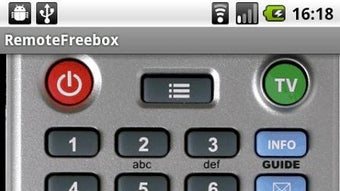
- Virtual Remote Control Interface – Provides a full-featured on-screen remote with navigation keys, volume controls, power, and media playback functions. This allows users to operate their FreeBox or AliceBox from any location within the home Wi-Fi range.
- On-Screen Keyboard Integration – Enables accurate text entry for searching content, entering usernames, or navigating menus. This feature significantly improves usability compared to traditional remotes with limited input options.
- Ad-Free Experience – The application is completely free of advertisements, ensuring uninterrupted interaction and a clean interface free from distractions.
- Support for Froyo (SD) Devices – Ensures compatibility with FreeBox models using the Froyo (SD) firmware, expanding the range of supported hardware.
- Landscape Mode with Animated Channel Logos – Offers an enhanced visual experience in landscape orientation, displaying channel logos in a scrolling format for improved navigation and engagement.
These capabilities make Remote Freebox a practical tool for daily use. For example, users can search for a specific movie while lying on the couch, or quickly switch channels during live events without needing to locate the physical remote. The integration of text input and visual enhancements supports a more intuitive and modern user experience, aligning with current expectations for smart home control applications.
User Interface, Workflow & Performance
The user interface of Remote Freebox is designed with simplicity and functionality in mind. The layout features a clear arrangement of essential controls, including directional navigation, playback, and system keys. Navigation is straightforward, with minimal on-screen clutter and logical button placement. Users can access the virtual keyboard by tapping a dedicated icon, enabling text input for search and menu navigation.
Workflow efficiency is enhanced by the app’s direct connection to the FreeBox or AliceBox via Wi-Fi, reducing the need for manual configuration. The app responds promptly to user inputs, suggesting stable performance under typical conditions. However, exact performance details such as CPU or RAM usage were not specified by the developer. Stability is likely maintained through integration with the official Freebox ecosystem, though real-world behavior may vary depending on network conditions and device capabilities. The app does not display any known performance bottlenecks based on available information.
Compatibility & System Requirements
Remote Freebox is designed for Android devices and requires a compatible FreeBox or AliceBox unit connected to the same local Wi-Fi network. The application is available in version 1.0.1 and has a file size of 2.5 MB, indicating a lightweight footprint. The developer did not provide additional system requirements, such as minimum Android version or hardware specifications. Compatibility with specific Android versions or device types remains unspecified. The app does not require root access or special permissions beyond standard network connectivity.
Installation is straightforward, and the app can be deployed directly on Android devices without additional setup. The lack of detailed system requirements suggests that the application is optimized for broad compatibility, though users are advised to ensure their device supports standard Wi-Fi communication and Android app execution. Platform compatibility information is limited, and users should refer to the developer’s website for any updates or troubleshooting guidance.
Pros and Cons
Pros
- Lightweight application at only 2.5 MB in size
- Ad-free interface for uninterrupted use
- Supports text input via virtual keyboard for easier content search
- Includes landscape mode with animated channel logos
- Direct Wi-Fi connectivity to FreeBox and AliceBox devices
- Free to download and use
Cons
- Exact system requirements were not listed
- Compatibility with older Android versions is unconfirmed
- No information on background performance or battery usage
- Limited to FreeBox and AliceBox devices only
- Developer support details are minimal beyond the website
FAQ Section
Is Remote Freebox compatible with all FreeBox models?
The app supports FreeBox and AliceBox devices that are compatible with Froyo (SD) firmware. Specific model compatibility was not detailed by the developer.
Can I use Remote Freebox without an internet connection?
Yes, the app operates over a local Wi-Fi network, so it does not require an internet connection. It only needs to be connected to the same local network as the FreeBox or AliceBox.
Is Remote Freebox safe to download and use?
As a free application developed by Freebox (Freebox), it is considered secure for use. The app does not request excessive permissions and operates within standard Android security parameters.
Does Remote Freebox require a paid subscription?
No, the application is completely free to download and use with no hidden fees or subscription models.
How do I update Remote Freebox?
Updates are typically available through the official app distribution channel. Users should check for updates in their device’s app store or visit the developer’s website for the latest version.
Final Thoughts + CTA
Remote Freebox delivers a practical, lightweight solution for users seeking to control their FreeBox or AliceBox devices via Android. With its intuitive interface, ad-free experience, and support for text input and landscape mode, it enhances the usability of home entertainment systems. While detailed system requirements and performance metrics are not available, the app’s design and functionality suggest reliable performance within its intended scope.
It is particularly well-suited for individuals who value convenience and digital integration in their home setup. For anyone owning a FreeBox or AliceBox, this app offers a seamless way to manage media from anywhere in the home. Download Remote Freebox now.





.png)

